# StreamZet Android SDK 0.2.0-rc.3
Documentation revision: 2026-09-23
https://streamzet.com/docs?lang=en
## Android quickstart
Both public test apps use English. The SDK itself supports English, Korean and Japanese when embedded in your ComponentActivity.
### Downloads and public test settings
- [First visit: try screen sharing without coding](https://streamzet.com/docs/try?lang=en)
Download the files below directly. The downloads guide provides the public test key and configuration; pair the device code in your own account for testing.
- [Android SDK package](https://api.streamzet.com/storage/v1/object/public/downloads/sdk/public/2026-09-23-key/streamzet-android-0.2.0-rc.3-public-20260923.zip?download=streamzet-android-0.2.0-rc.3-public-20260923.zip) — Android 8+ / API 26+, 0.2.0-rc.3. Maven repository, AAR, sample source, both test APKs, public test configuration and offline guides.
- [Business sample APK](https://api.streamzet.com/storage/v1/object/public/downloads/sdk/public/2026-09-23-key/streamzet-business-sample-0.2.0-rc.3.apk?download=streamzet-business-sample-0.2.0-rc.3.apk) — Android 8+ / API 26+, 0.2.0-rc.3. English UI. An SDK embedded in a business screen. Test product entry and remote support. Debug signed for evaluation.
- [Standalone support APK](https://api.streamzet.com/storage/v1/object/public/downloads/sdk/public/2026-09-23-key/streamzet-support-0.2.0-rc.3.apk?download=streamzet-support-0.2.0-rc.3.apk) — Android 8+ / API 26+, 0.2.0-rc.3. English UI. A standalone app for starting and stopping screen sharing and control. Public configuration included; debug signed for evaluation.
- [Public test key, configuration and run steps](https://streamzet.com/docs/downloads?lang=en#public-test-key)
### Test applications
| Field / API | Type / default | Contract |
| --- | --- | --- |
| jci-sample-debug.apk | com.streamzet.sample.jci | Business host example: product and quantity fields, support start/stop. Inventory is never changed. |
| streamzet-support-debug.apk | com.streamzet.support | Standalone support UI using the same public SDK. Debug signed for evaluation, not production distribution. |
```sh
adb install -r jci-sample-debug.apk
# Or install the support app:
adb install -r streamzet-support-debug.apk
```
Open the app and tap Start support. Registration, disclosure, optional accessibility, notification permission and Android screen-sharing consent follow in order. Pair the displayed device code in Devices → Add device. Screen-only support works without accessibility. The device is online only during consented support.
- [Follow the illustrated app guide](https://streamzet.com/docs/android/test-apps?lang=en)
### AAR and host setup
Use the delivered local Maven repository with com.streamzet:remote-support-android:0.2.0-rc.3 so transitive dependencies resolve. A raw AAR alone is insufficient. Build with JDK 17, compileSdk 35 and minSdk 26. Keep the merged SDK service manifest entries. Disable backup of device identity, following the sample manifest.
```kotlin
// settings.gradle.kts: add to dependencyResolutionManagement.repositories
maven { url = uri("vendor/streamzet-maven") }
google()
mavenCentral()
// app/build.gradle.kts
implementation("com.streamzet:remote-support-android:0.2.0-rc.3")
```
```kotlin
private lateinit var launcher: SupportLauncher
override fun onCreate(savedInstanceState: Bundle?) {
super.onCreate(savedInstanceState)
val support = StreamzetSupport.getInstance()
?: StreamzetSupport.initialize(applicationContext, SupportConfig(
apiKey = "sz_test_public",
deviceName = "Store handheld",
))
launcher = SupportLauncher.bind(this, support) { ui ->
// Render ui.message, ui.deviceCode, ui.canStart and ui.canStop.
}
// From user actions: launcher.start() / launcher.stop()
}
```
Bind once per Activity before STARTED, including after rotation; reuse the process instance. Do not close support in onDestroy. Destroying the Activity detaches the UI but does not stop an already approved session. Each new session needs fresh Android consent; process death invalidates old consent.
- [Integrate with complete code and Manifest](https://streamzet.com/docs/android/integration?lang=en)
### SDK key configuration
| Field | Default | Usage |
| --- | --- | --- |
| sdk.apiKey | sz_test_public | StreamZet key: sz_test_public for evaluation, or an issued sz_live_ key for tenant enrollment. The SDK manages service endpoints and its public transport key. |
```properties
# Optional sdk-test.properties in the sample project root
# Evaluation is the default; endpoints are managed inside the SDK.
sdk.apiKey=sz_test_public
```
> sz_test_public selects public evaluation. It grants no account or tenant access and does not create an isolated sandbox. Sign in with your own account and pair the device code. Values in distributed apps can be extracted; never embed administrator secrets.
### Behavior and limits
A single authenticated operator per approved session. No unattended sharing, shell/Fleet, file transfer or app installation API. Secure/password fields are excluded; custom widgets and OEM accessibility behavior need device tests. Enter/Search uses the editor action on API 30+; on API 26–29 tap the app’s submit button. UI follows the Android app/system locale; machine enum codes remain unchanged.
## Integrate into your app
From the delivered Maven package to a compilable Activity, permissions, lifecycle and release checks.
### Downloads and public test settings
- [First visit: try screen sharing without coding](https://streamzet.com/docs/try?lang=en)
This page is for developers who can edit and build the host app. To try the features first, use the no-code walkthrough or test-app guide above.
Download the files below directly. The downloads guide provides the public test key and configuration; pair the device code in your own account for testing.
- [Android SDK package](https://api.streamzet.com/storage/v1/object/public/downloads/sdk/public/2026-09-23-key/streamzet-android-0.2.0-rc.3-public-20260923.zip?download=streamzet-android-0.2.0-rc.3-public-20260923.zip) — Android 8+ / API 26+, 0.2.0-rc.3. Maven repository, AAR, sample source, both test APKs, public test configuration and offline guides.
- [Business sample APK](https://api.streamzet.com/storage/v1/object/public/downloads/sdk/public/2026-09-23-key/streamzet-business-sample-0.2.0-rc.3.apk?download=streamzet-business-sample-0.2.0-rc.3.apk) — Android 8+ / API 26+, 0.2.0-rc.3. English UI. An SDK embedded in a business screen. Test product entry and remote support. Debug signed for evaluation.
- [Standalone support APK](https://api.streamzet.com/storage/v1/object/public/downloads/sdk/public/2026-09-23-key/streamzet-support-0.2.0-rc.3.apk?download=streamzet-support-0.2.0-rc.3.apk) — Android 8+ / API 26+, 0.2.0-rc.3. English UI. A standalone app for starting and stopping screen sharing and control. Public configuration included; debug signed for evaluation.
- [Public test key, configuration and run steps](https://streamzet.com/docs/downloads?lang=en#public-test-key)
> The distributed sample apps use English, with resourceConfigurations limited to en in app/sample. When adapting them for a Japanese or Korean host app, include your supported languages or remove that filter. The SDK AAR retains all three languages.
### 1. Prerequisites and compatibility
Use SDK 0.2.0-rc.3, declared minSdk 26, compileSdk 35 and JDK/JVM target 17. The example is built with AGP 8.7.3, Kotlin 2.0.21 and Gradle 8.14.3. This RC is for integration evaluation; it is not certification of every manufacturer device.
Use a StreamZet SDK key and your own account. For evaluation, use sz_test_public. The SDK manages endpoints and the public transport key; no separate environment variables or URLs are required. Public APKs already include the evaluation key.
### 2. Add the Maven dependency
Copy the ZIP’s maven directory to vendor/streamzet-maven in your host project. Paths below are relative to the host project root. Preserve the POM and Gradle module files. Third-party dependencies require access to Google Maven and Maven Central.
```kotlin
// settings.gradle.kts — inside dependencyResolutionManagement
repositories {
google()
mavenCentral()
maven { url = uri("vendor/streamzet-maven") }
}
// app/build.gradle.kts
android {
compileSdk = 35
defaultConfig { minSdk = 26 }
compileOptions {
sourceCompatibility = JavaVersion.VERSION_17
targetCompatibility = JavaVersion.VERSION_17
}
kotlinOptions { jvmTarget = "17" }
}
dependencies {
implementation("com.streamzet:remote-support-android:0.2.0-rc.3")
}
```
> Copying only the AAR does not resolve transitive dependencies. Use the delivered Maven directory. If your app already embeds another org.webrtc distribution, resolve duplicate Java/native libraries and verify the minified release at runtime.
### 3. Complete minimal Activity
This file includes every import, complete UI and public test connection settings. In an existing app, copy initialization, bind, state rendering and start/stop calls. The test project uses package/namespace com.example.support.
```kotlin
package com.example.support
import android.os.Bundle
import android.widget.Button
import android.widget.LinearLayout
import android.widget.TextView
import androidx.activity.ComponentActivity
import com.streamzet.sdk.StreamzetSupport
import com.streamzet.sdk.SupportConfig
import com.streamzet.sdk.SupportLauncher
/** Public evaluation settings. Pair this device with your own StreamZet account. */
class MinimalSupportActivity : ComponentActivity() {
private lateinit var launcher: SupportLauncher
override fun onCreate(savedInstanceState: Bundle?) {
super.onCreate(savedInstanceState)
val status = TextView(this)
val code = TextView(this)
val start = Button(this).apply { text = "Start support" }
val stop = Button(this).apply { text = "Stop support" }
setContentView(LinearLayout(this).apply {
orientation = LinearLayout.VERTICAL
setPadding(32, 96, 32, 32)
addView(status)
addView(code)
addView(start)
addView(stop)
})
val support = StreamzetSupport.getInstance() ?: StreamzetSupport.initialize(
applicationContext,
SupportConfig(
apiKey = "sz_test_public",
deviceName = "Integration test",
),
)
launcher = SupportLauncher.bind(this, support) { ui ->
status.text = ui.message
code.text = ui.deviceCode.orEmpty()
start.isEnabled = ui.canStart
stop.isEnabled = ui.canStop
}
start.setOnClickListener { launcher.start() }
stop.setOnClickListener { launcher.stop() }
}
}
```
```xml
```
### 4. Permissions and app identification
The AAR merges INTERNET, foreground service/mediaProjection, POST_NOTIFICATIONS and the capture/accessibility services. Inspect Android Studio’s Merged Manifest instead of duplicating them. Each session needs fresh screen-sharing consent; remote input also requires this app’s accessibility permission.
Override the following resource in the host and translate it for your supported languages so the accessibility entry identifies your app. If Android shows restricted settings, follow that device’s approved user/management flow.
```xml
My Store remote support
```
### 5. Lifecycle and error handling
1. Bind once in Activity.onCreate, not in a button handler or onStart. Rebind the same SDK instance when the Activity is recreated after rotation.
2. Call start/stop from user actions on the main thread. ACCEPTED acknowledges the request; CONNECTED indicates the session. Drive buttons from canStart/canStop and branch on error, stopReason and preparationError enums.
3. Do not call SDK stop/close in the business screen’s onStop/onDestroy. Navigation does not end support. Provide an explicit stop button to end capture and input.
4. Display ui.message, but never compare translated text for program logic. Existing ViewBinding, Compose or Fragment UI can call the launcher owned by the host Activity.
### 6. Before releasing the host app
Test sharing, input, stop and reconnect in your signed minified release, beyond a debug build. Updates preserving applicationId, signing identity and app data preserve registration. Clearing data, uninstalling or changing backend may require registration again. The SDK does not update the host APK.
- [Test app guide and acceptance checklist](https://streamzet.com/docs/android/test-apps?lang=en)
## Android API reference
Complete public configuration and method contracts. Kotlin names are stable across all documentation languages.
### Downloads and public test settings
Download the files below directly. The downloads guide provides the public test key and configuration; pair the device code in your own account for testing.
- [Android SDK package](https://api.streamzet.com/storage/v1/object/public/downloads/sdk/public/2026-09-23-key/streamzet-android-0.2.0-rc.3-public-20260923.zip?download=streamzet-android-0.2.0-rc.3-public-20260923.zip) — Android 8+ / API 26+, 0.2.0-rc.3. Maven repository, AAR, sample source, both test APKs, public test configuration and offline guides.
- [Business sample APK](https://api.streamzet.com/storage/v1/object/public/downloads/sdk/public/2026-09-23-key/streamzet-business-sample-0.2.0-rc.3.apk?download=streamzet-business-sample-0.2.0-rc.3.apk) — Android 8+ / API 26+, 0.2.0-rc.3. English UI. An SDK embedded in a business screen. Test product entry and remote support. Debug signed for evaluation.
- [Standalone support APK](https://api.streamzet.com/storage/v1/object/public/downloads/sdk/public/2026-09-23-key/streamzet-support-0.2.0-rc.3.apk?download=streamzet-support-0.2.0-rc.3.apk) — Android 8+ / API 26+, 0.2.0-rc.3. English UI. A standalone app for starting and stopping screen sharing and control. Public configuration included; debug signed for evaluation.
- [Public test key, configuration and run steps](https://streamzet.com/docs/downloads?lang=en#public-test-key)
### SupportConfig
| Field / API | Type / default | Contract |
| --- | --- | --- |
| apiKey | String · required | StreamZet key: sz_test_public for evaluation, or an issued sz_live_ key for tenant enrollment. The SDK manages service endpoints and its public transport key. |
| deviceName | String · required | Nonblank, at most 128 Kotlin UTF-16 code units (String.length), not bytes. |
| sessionTimeoutSeconds | Int · 0 | Seconds. 0 disables elapsed-time expiry; otherwise 60–14400 inclusive. User/operator/system stop still applies. |
| connectionTimeoutSeconds | Int · 120 | Seconds, 15–300 inclusive. Negotiation watchdog retries; it does not end sharing consent. |
| framesPerSecond | Int · 30 | Capture request rate, 1–30 inclusive; actual delivered FPS depends on load/network. |
| maxVideoDimension | Int · 1600 | Pixels on longest encoded edge. 0 preserves display resolution; otherwise 640–3840 inclusive. Aspect ratio retained. |
Configuration is immutable. Invalid fields throw at construction (IllegalArgumentException; malformed URI syntax may throw URISyntaxException). No network is performed by the constructor. toString redacts credentials.
> sz_test_public selects public evaluation. It grants no account or tenant access and does not create an isolated sandbox. Sign in with your own account and pair the device code. Values in distributed apps can be extracted; never embed administrator secrets.
### SupportLauncher · recommended flow
| Field / API | Type / default | Contract |
| --- | --- | --- |
| bind(activity, support, listener) | → SupportLauncher | activity: ComponentActivity before STARTED; support: initialized process instance; listener: SupportUiListener main-thread callback. Once per Activity. Reuse support across rotation; invalid lifecycle/duplicate binding throws IllegalStateException. |
| state | SupportUiState | Snapshot for rendering. See the state reference for every field. |
| start() | → SupportStartResult | Main thread, explicit user action in RESUMED Activity. ACCEPTED only schedules preparation; registration, permissions and connection may still fail. |
| stop() | → Unit | Main thread. Cancels preparation or stops active support; repeatable. Destroying the Activity alone only detaches the coordinator. |
### StreamzetSupport · lifecycle and manual flow
| Field / API | Type / default | Contract |
| --- | --- | --- |
| initialize(context, config) | → StreamzetSupport | context: Android Context, retained as applicationContext; config: SupportConfig. Main thread, once per process; duplicate initialization throws IllegalStateException. |
| getInstance() | → StreamzetSupport? | Existing process instance, or null before initialize/after close. Does not initialize automatically. |
| register() | suspend → Result | Any dispatcher; concurrent calls share one request. Active support returns failure. Network/auth errors return sanitized failure and ERROR/REGISTRATION_FAILED. Closed SDK throws; coroutine cancellation propagates. Registration alone does not share the screen or report online. |
| state | StateFlow | Read-only latest state. Collect with the host lifecycle. |
| isControlAvailable | Boolean | Current accessibility input-service availability. true does not prove a viewer is connected or that every widget is controllable. |
| createScreenCaptureIntent() | → Intent | Manual flow only: after register, visible user request, main thread, inactive support. Marks AWAITING_CONSENT. Launch through Activity Result API. Missing registration/active/closed state throws IllegalStateException. |
| onScreenCaptureResult(activity, resultCode, data) | → Boolean | activity: live Activity; resultCode: system Int; data: Intent?. Consumes one pending result. false for denial, null/stale/duplicate data or service-start failure. true means service start accepted, not connected. Never persist/reuse projection data. |
| accessibilitySettingsIntent() | → Intent | Intent for Android accessibility settings; launch from host UI. Does not grant permission. |
| addListener(listener) | → Unit | SupportListener receives current and future SupportState on main thread. Duplicate same listener is deduplicated; callback exceptions are isolated. |
| removeListener(listener) | → Unit | Main thread. Remove the exact listener instance when the host view is destroyed. Missing listener is harmless. |
| stop() | → Unit | Main thread; repeatable, including pending registration/consent. Stops capture/input/signaling; closed SDK is a no-op. |
| close() | → Unit | Main thread. Stops support, releases listeners/network resources and clears singleton; repeatable. Use only when the host no longer needs the SDK, not Activity rotation. |
Non-suspending lifecycle methods are main-thread APIs; wrong-thread calls may throw IllegalStateException. SupportListener.onStateChanged(state: SupportState) and SupportUiListener.onStateChanged(state: SupportUiState) return Unit. RemoteInputService is registered for Android to bind; do not instantiate or call its framework lifecycle methods.
## Android states and errors
Every public state field and enum value. Branch on machine codes; display the localized message.
### DeviceRegistration
| Field / API | Type / default | Contract |
| --- | --- | --- |
| deviceId | String · required | Server device UUID; display/log identifier, not a secret. |
| deviceCode | String · required | Code for dashboard pairing; available after registration. Do not infer format or validity from length. |
### SupportState
| Field / API | Type / default | Contract |
| --- | --- | --- |
| phase | SupportPhase · IDLE | Lifecycle phase; enum values are listed below. |
| device | DeviceRegistration? · null | Registration snapshot. May remain populated after stop/error; not online status. |
| controlAvailable | Boolean · false | Accessibility service availability at the state update. |
| stopReason | StopReason? · null | Reason for the latest stop transition, otherwise null. |
| error | SupportError? · null | Sanitized error category, otherwise null. Never contains raw HTTP/token/SDP. |
| isActive | Boolean · computed | true in AWAITING_CONSENT, STARTING, WAITING_FOR_OPERATOR, CONNECTING, CONNECTED, RECONNECTING, STOPPING. REGISTERING is false. |
### SupportUiState
| Field / API | Type / default | Contract |
| --- | --- | --- |
| support | SupportState · required | Underlying state; control availability is refreshed by the launcher. |
| message | String · required | Display-ready status or preparation error in en/ko/ja. Do not parse this text for logic. |
| isPreparing | Boolean · required | Registration/disclosure/permission preparation is in progress. |
| preparationError | SupportPreparationError? · required | null normally; recoverable failure opening settings/consent UI. A later start can retry. |
| canStart | Boolean · required | No preparation, active session or registration. start() additionally checks Activity RESUMED. |
| canStop | Boolean · required | Preparation, registration or an active support phase can be stopped. |
| deviceCode | String? · computed | support.device?.deviceCode; null before registration. |
| controlAvailable | Boolean · computed | Alias for support.controlAvailable. |
### SupportPhase
| Field / API | Type / default | Contract |
| --- | --- | --- |
| IDLE | enum | Initialized, no active request. |
| REGISTERING | enum | Registering/authenticating the installation. |
| READY | enum | Registered; no sharing consent yet. |
| AWAITING_CONSENT | enum | Android capture consent is pending. |
| STARTING | enum | Foreground capture service starting. |
| WAITING_FOR_OPERATOR | enum | Approved sharing is waiting for an operator. |
| CONNECTING | enum | Peer negotiation in progress. |
| CONNECTED | enum | Authenticated peer connected. |
| RECONNECTING | enum | Connection recovery in progress; consent is retained. |
| STOPPING | enum | Explicit shutdown in progress. |
| STOPPED | enum | Sharing has stopped; inspect stopReason. |
| ERROR | enum | Failure; inspect error and optionally stopReason. |
### StopReason
| Field / API | Type / default | Contract |
| --- | --- | --- |
| USER | enum | Host/person stopped support. |
| OPERATOR | enum | Remote operator ended support. |
| SYSTEM | enum | Android revoked capture or stopped service. |
| TIMEOUT | enum | Configured session lifetime expired. |
| PERMISSION_DENIED | enum | Capture consent denied/invalid or Activity unavailable. |
| ERROR | enum | Failure stopped support/preparation. |
### SupportError
| Field / API | Type / default | Contract |
| --- | --- | --- |
| REGISTRATION_FAILED | enum | Registration/auth bootstrap failed; check config and connectivity, then retry. |
| AUTHENTICATION_FAILED | enum | Session/device authentication failed; inspect registration and account access. |
| NETWORK_UNAVAILABLE | enum | Network failure category; inspect connectivity. |
| CAPTURE_FAILED | enum | Screen capture could not be started/maintained; request fresh consent. |
| CONNECTION_FAILED | enum | Peer connection failure category; inspect signaling/TURN. |
| SERVICE_START_FAILED | enum | Android rejected foreground service start; use a visible Activity. |
### SupportStartResult
| Field / API | Type / default | Contract |
| --- | --- | --- |
| ACCEPTED | enum | Preparation accepted; not a connection guarantee. |
| ALREADY_ACTIVE | enum | Support is already active. |
| BUSY | enum | Preparation/registration already pending. |
| HOST_NOT_RESUMED | enum | Activity is not RESUMED, is finishing or destroyed. |
### SupportPreparationError
| Field / API | Type / default | Contract |
| --- | --- | --- |
| SETTINGS_UNAVAILABLE | enum | Could not launch accessibility settings. |
| CAPTURE_CONSENT_UNAVAILABLE | enum | Could not launch Android capture consent. |
## Test app guide
Install the business sample and standalone support app, then start, verify and stop user-approved remote support.
### Downloads and public test settings
- [First visit: try screen sharing without coding](https://streamzet.com/docs/try?lang=en)
Download the files below directly. The downloads guide provides the public test key and configuration; pair the device code in your own account for testing.
- [Android SDK package](https://api.streamzet.com/storage/v1/object/public/downloads/sdk/public/2026-09-23-key/streamzet-android-0.2.0-rc.3-public-20260923.zip?download=streamzet-android-0.2.0-rc.3-public-20260923.zip) — Android 8+ / API 26+, 0.2.0-rc.3. Maven repository, AAR, sample source, both test APKs, public test configuration and offline guides.
- [Business sample APK](https://api.streamzet.com/storage/v1/object/public/downloads/sdk/public/2026-09-23-key/streamzet-business-sample-0.2.0-rc.3.apk?download=streamzet-business-sample-0.2.0-rc.3.apk) — Android 8+ / API 26+, 0.2.0-rc.3. English UI. An SDK embedded in a business screen. Test product entry and remote support. Debug signed for evaluation.
- [Standalone support APK](https://api.streamzet.com/storage/v1/object/public/downloads/sdk/public/2026-09-23-key/streamzet-support-0.2.0-rc.3.apk?download=streamzet-support-0.2.0-rc.3.apk) — Android 8+ / API 26+, 0.2.0-rc.3. English UI. A standalone app for starting and stopping screen sharing and control. Public configuration included; debug signed for evaluation.
- [Public test key, configuration and run steps](https://streamzet.com/docs/downloads?lang=en#public-test-key)
> Both public test apps use English regardless of device language. Android installation, permission and Settings screens follow the device language. Screenshots use an English device. The SDK retains Korean, Japanese and English resources for your own app.
### 1. Choose the app
| App / file | Purpose |
| --- | --- |
| JCI Store · Support sample / streamzet-business-sample-0.2.0-rc.3.apk | An SDK embedded in a business screen. Use product code, quantity and lookup to test touch/text; it does not change real inventory. |
| Streamzet Support / streamzet-support-0.2.0-rc.3.apk | A standalone app for starting/stopping support. Switch to another app to check screen sharing. |
The apps have different applicationIds and independent registration, so their device codes differ. Share from one app at a time and stop before testing the other.
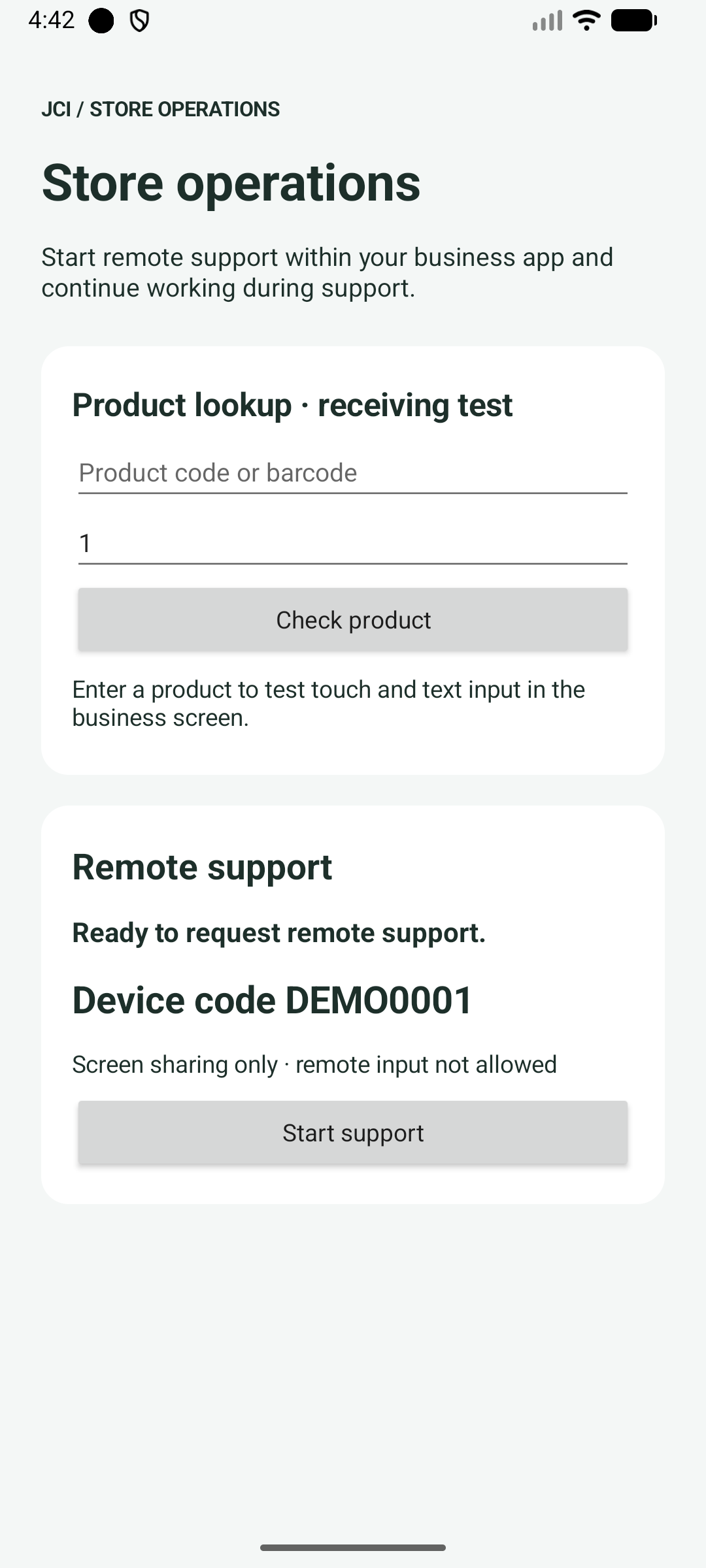
The business sample uses English. Scroll down to Open setup guide for step-by-step instructions.
> Screenshots show the actual apps on an Android 16 emulator. The local display code DEMO0001 is a documentation fixture and cannot be used to connect. Use the code shown in your own app.
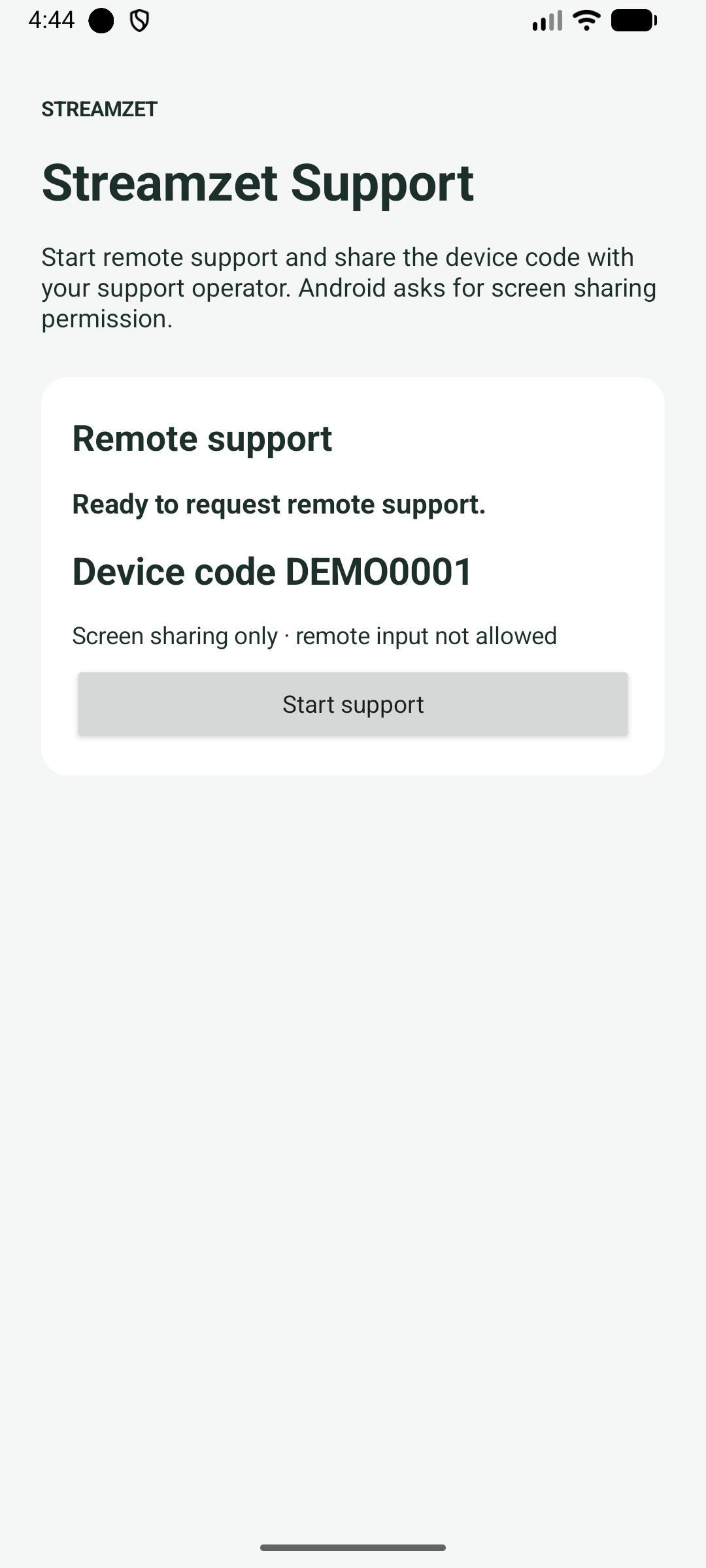
Streamzet Support provides support status and start/stop controls, without the business input fields.
### 2. Install and launch
Start with just the standalone support APK above. Both APKs include public connection settings, so no key entry or source build is needed. Sign into your own StreamZet account in a PC browser.
1. Download the APK on Android 8+ and open Files → Downloads. Transfer PC downloads to Android before opening.
2. Verify the app name, then choose Install → Open. If installation-source permission is requested, allow that browser or file app. Contact your administrator if organization policy blocks it.
3. For a signature conflict, keep the installed app until data preservation is clarified. Send the app name, filename and error screen through Contact support.
- [Follow the installation screenshots](https://streamzet.com/docs/try?lang=en#install)
### 3. Start and choose permissions
1. Tap Start support. The first run registers the device and shows its code. Read what the operator can access, then continue.
2. For remote touch/text, choose OPEN SETTINGS. Enable JCI Store remote support for the business sample or Streamzet Support remote input for the standalone app, approve Android’s prompt and return.
3. Choose SHARE SCREEN ONLY to allow viewing without accessibility input. Declining notifications is separate from declining screen sharing.
4. Review the scope in Android’s sharing dialog and choose Share screen. App/entire-screen choices and wording vary by Android version. Cancel leaves sharing off and allows retry.
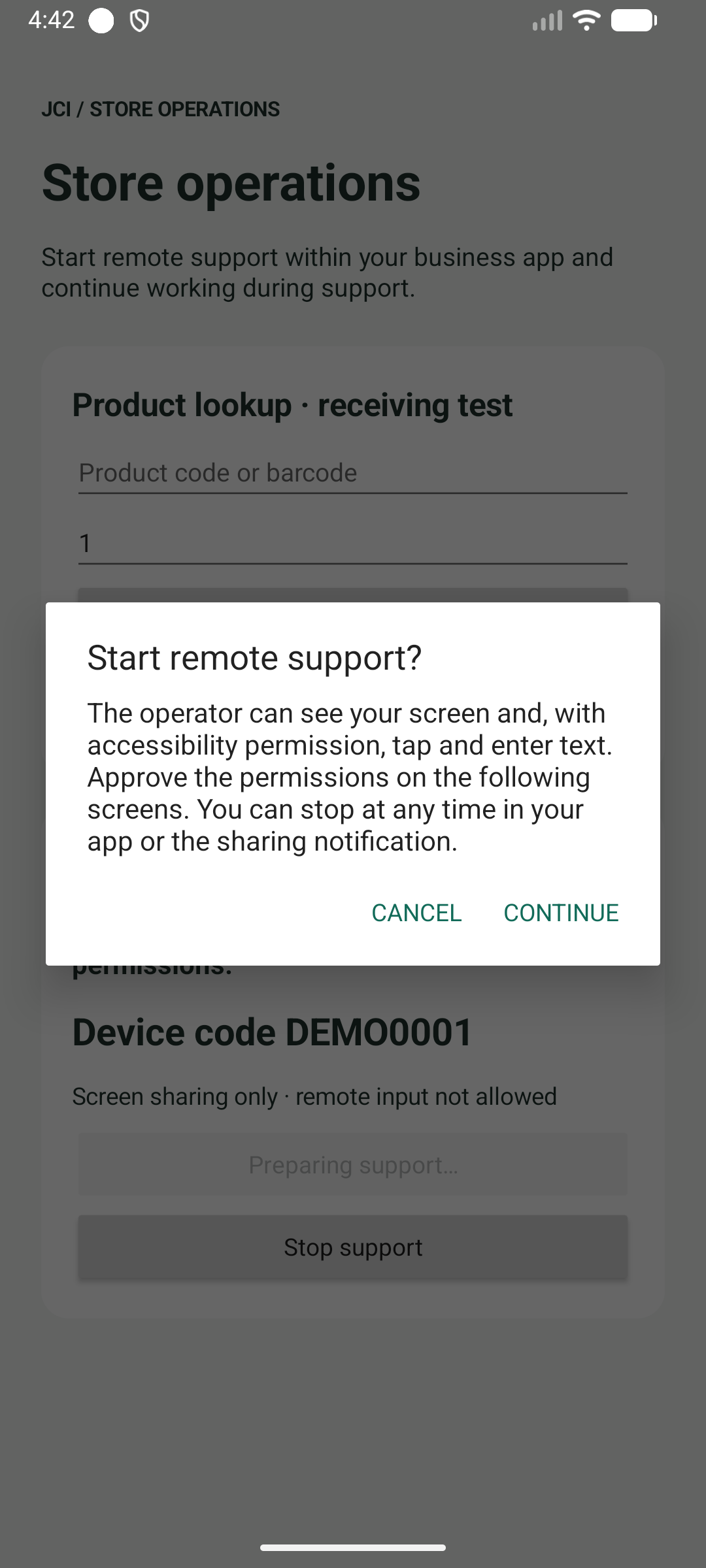
Read the scope before choosing to continue.
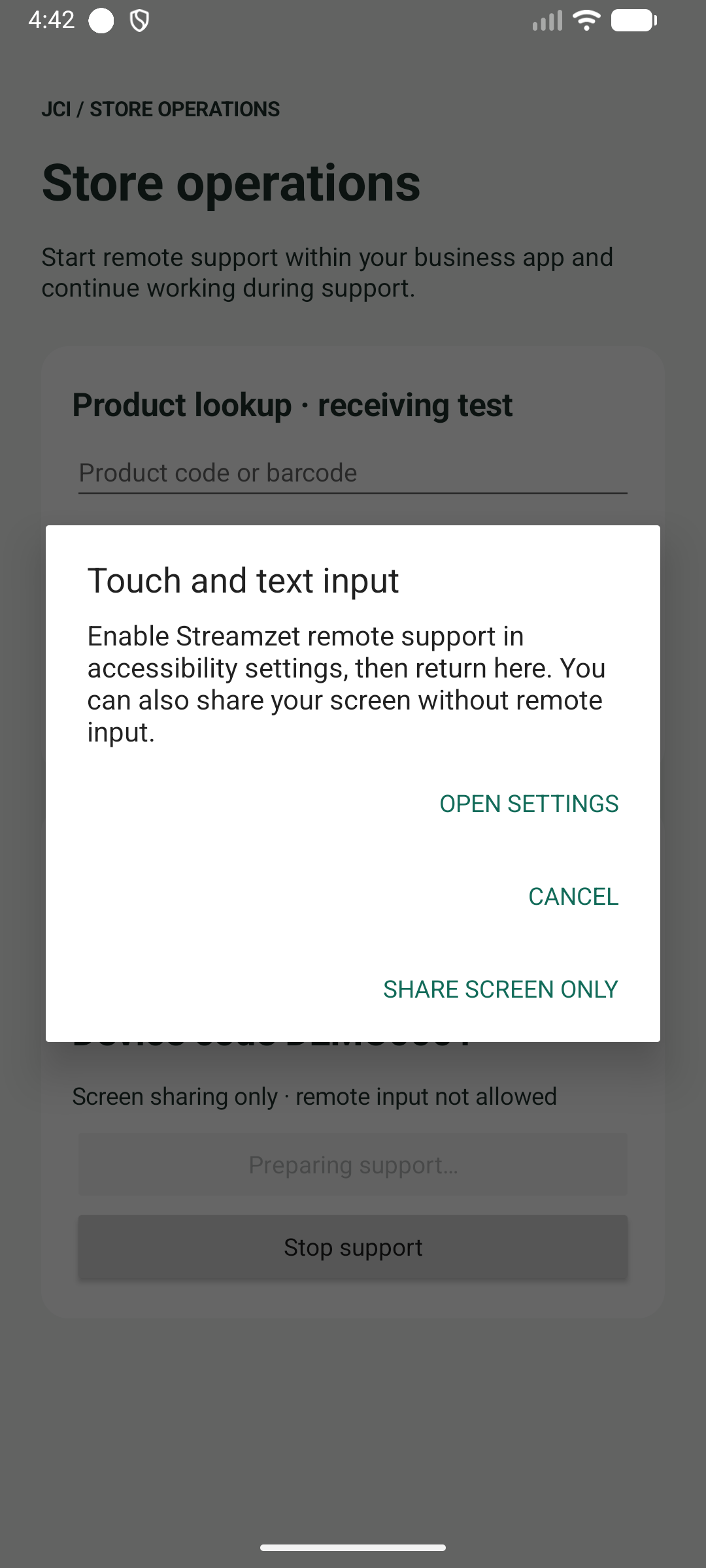
Accessibility is optional. Test the screen-only path as well.
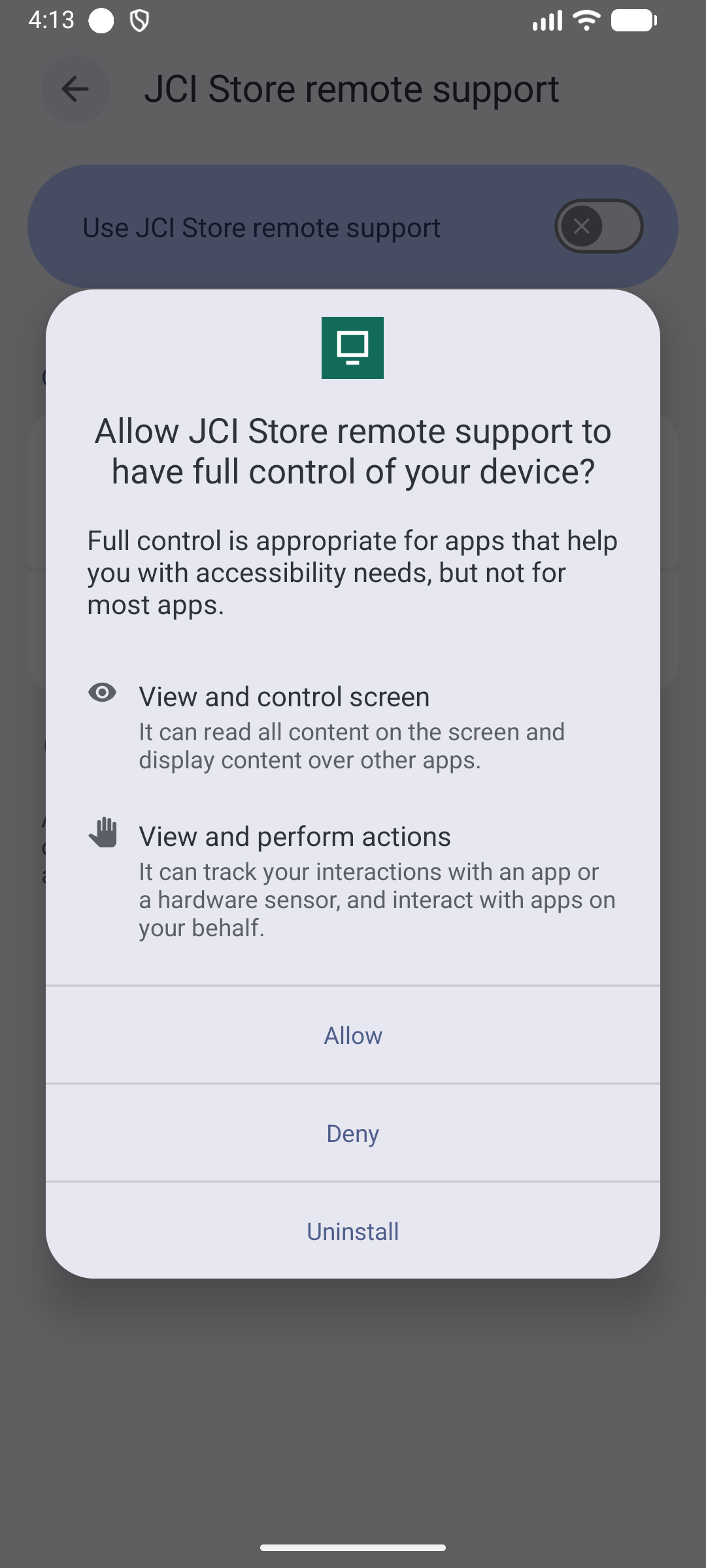
Android 16 test capture. On the target device, confirm the app name and OS explanation before the user approves.
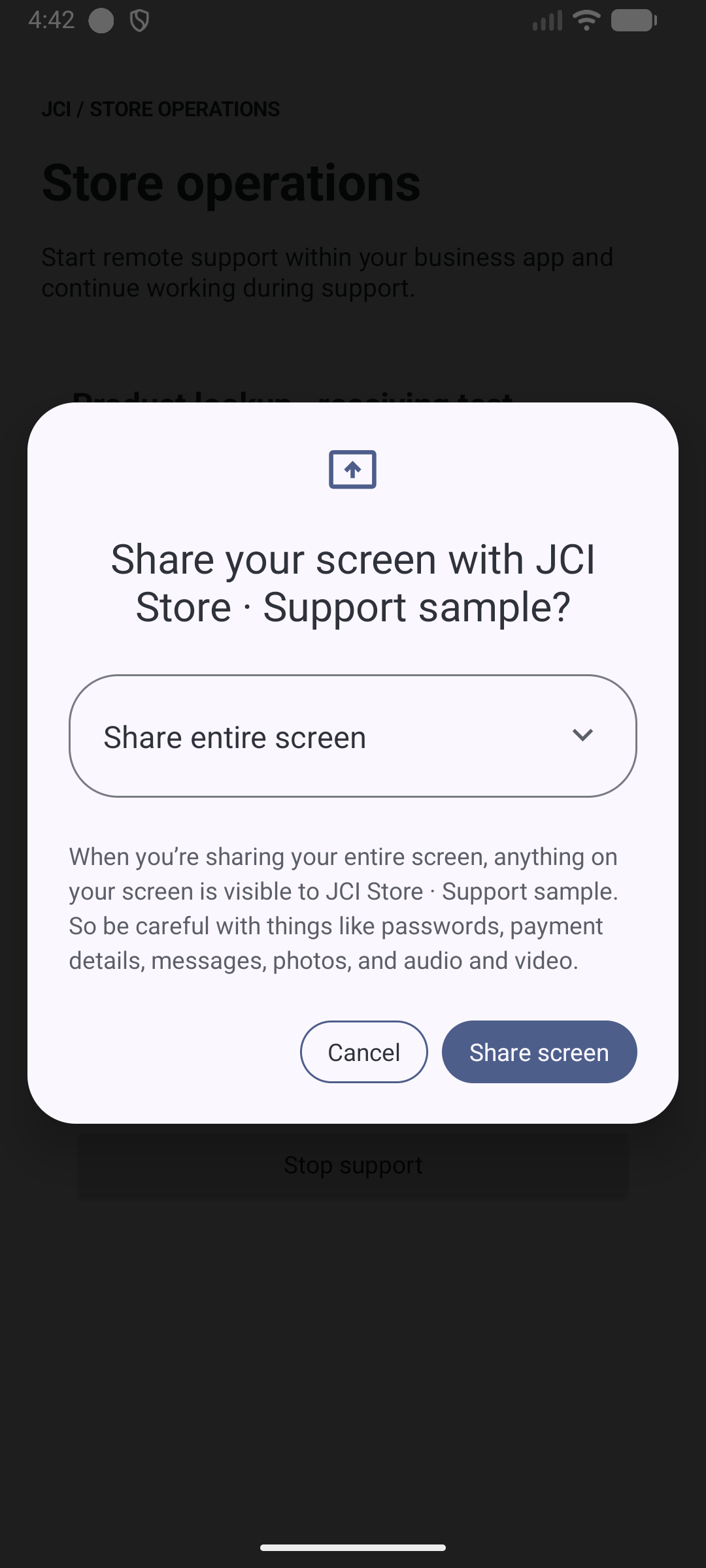
Fresh system consent is required for each new support session. Select the entire screen if other apps must be visible.
### 4. Connect the operator and verify
1. Share the displayed 8-character code with the authorized operator. Do not publish it or distribute it in screenshots/logs. A code alone does not mean sharing is active.
2. On the PC, open StreamZet Devices, register that app’s code, then start the registered device’s session. If your organization separately configured automatic enrollment, follow its administrator’s instructions.
3. Confirm that the app is waiting for the operator, then start its remote session from the dashboard. Verify moving video, connection state and the remote-input indicator.
4. In the business sample, remotely enter SDK-TEST-123, change quantity and tap Check product. For the standalone app, open an approved test app and check touch, Back, Home and text. Use no passwords or personal data.
5. Screen-only sessions must reject remote input. Rotate/navigate and check continuing video. Product lookup is a fixed demo, not validation of a scanner or inventory backend.
- [Actual PC registration dialog and connection steps](https://streamzet.com/docs/try?lang=en#pair)
### 5. Stop, restart and update
Stop with the app’s Stop support, the dashboard’s End support, or Android’s sharing stop control. Verify video/input stop and Start becomes available. A new session requires consent again. Navigating away or backgrounding the app does not itself stop support.
Verify code persistence after a same-signature update and app restart. Do not interchange the two APKs’ codes. Uninstall/data-clear tests can create new registration; coordinate how old pairing/history is handled.
### Troubleshooting
| Symptom | Check and action |
| --- | --- |
| Configuration error / cannot start | Confirm you installed the public APK from this page. If a fresh download still cannot start, send the app name, Android version and error screen through Contact support. |
| Registration failed | Check internet access and try again. If a fresh public APK still fails, send the app name, device and error text through Contact support. No manual key changes are needed. |
| Waiting for operator | Pair the code from the app currently sharing, then select Start Session for that device. End any earlier session first. If it fails only on your company network, contact your administrator. |
| Video works, input does not | Check view-only mode and enable this app’s accessibility service. Secure fields, protected screens and OEM restrictions are separate limits. |
| Enter/search does not work | IME Enter actions require API 30+ and editor support. On Android 8–10 or custom editors, tap the on-screen search button. |
| Signature mismatch / install failure | If data must be preserved, obtain an APK signed with the existing key rather than uninstalling. |
### Build the test apps from source
The following is an optional developer workflow, unnecessary for trying the public APKs. Inside the ZIP, the APKs are named jci-sample-debug.apk and streamzet-support-debug.apk, unlike the direct web-download names.
```sh
# Inside the public ZIP's source directory:
# The public ZIP already includes sdk-test.properties.
# For a fresh repository checkout, download it from /docs/downloads.
# The default sdk.apiKey=sz_test_public needs no URL configuration.
# Use only sz_test_public in redistributable evaluation APKs.
./gradlew :sample:assembleDebug :app:assembleDebug
# Both apps use the ZIP's Maven SDK by default.
# Outputs:
# sample/build/outputs/apk/debug/sample-debug.apk
# app/build/outputs/apk/debug/app-debug.apk
```
> For support, provide SDK/APK version, Android version/model, app, timestamp, state/error enums, reproduction steps and sanitized logs. Exclude passwords, enrollment keys, device secrets and TURN tokens.
```sh
# From the source directory after building:
adb install -r sample/build/outputs/apk/debug/sample-debug.apk
adb install -r app/build/outputs/apk/debug/app-debug.apk
```